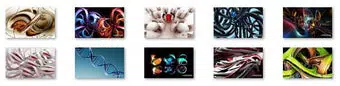

Download 3D Abstract Windows 7 Theme – 3D Abstract Backgrounds, Windows 7 Desktop Theme, Windows 7 Backgrounds, Windows 7 Wallpapers, 3D Abstract Wallpapers, Abstract Desktop Theme, 3D Wallpapers, Windows 7 Theme, Desktop Theme, Windows 7 Background, 3D Backgrounds, Abstract Backgrounds, Windows 7 Wallpapers, Abstract Wallpapers, Desktop Background, 3D Desktop Theme, Windows 7 Desktop Background
Overview
The 3D Abstract Windows 7 Theme is a visually immersive desktop customization tool designed for users seeking to elevate their Windows 7 experience with artistic flair. This theme offers ten high-resolution backgrounds, each meticulously crafted to showcase intricate 3D abstract shapes. With a consistent resolution of 1920 x 1200 pixels, the images maintain sharp clarity and vibrant detail across compatible displays. The primary purpose of the theme is to transform the default desktop environment into a dynamic, visually engaging workspace. It caters to users who value aesthetics, creativity, and a personalized computing experience.
Target users include individuals who use Windows 7 for personal or professional purposes and wish to enhance their desktop’s visual appeal. This includes designers, students, remote workers, and casual users who appreciate modern, abstract art. The theme addresses the common desire for a more stimulating digital environment, helping to foster creativity and improve user engagement. While the developer, SoftPas, is noted in the metadata, no additional background information about the company or its other products was provided. The theme serves as a lightweight utility within the broader desktop customization ecosystem, offering a simple yet effective way to refresh an operating system interface.
Real-world use cases include using the theme in creative studios, home offices, or educational settings where a visually rich environment can support focus and inspiration. The theme’s compatibility with Windows 7 ensures it remains a relevant tool for legacy system users. Its release date, September 2, 2010, places it within a period when desktop personalization was gaining popularity, reflecting the enduring demand for visual customization even on older platforms.
Key Features & Functionality
- High-Resolution Backgrounds (1920 x 1200): Each of the ten backgrounds is rendered at a resolution of 1920 x 1200 pixels, ensuring sharpness and clarity on standard and widescreen displays. This resolution supports high-definition visuals without pixelation, ideal for users with monitors that support full HD.
- Stunning 3D Abstract Designs: The collection features unique 3D abstract shapes that create depth and movement. These designs are not static; they evoke a sense of motion and complexity, contributing to a more dynamic desktop atmosphere.
- Effortless Installation: The theme is designed for simplicity—installation requires only a double-click. This user-friendly approach ensures accessibility for users with varying technical skill levels, from beginners to intermediate users.
- Enhanced Desktop Aesthetic: By replacing default wallpapers with artistic, colorful 3D imagery, the theme significantly improves visual appeal. A well-designed desktop can influence mood and productivity, making the workspace more inviting and stimulating.
- Style Versatility: The abstract nature of the designs allows the theme to blend seamlessly with various desktop setups, whether minimalist, modern, or eclectic. Its adaptability makes it suitable for users with diverse aesthetic preferences.
For example, a graphic designer might use the theme to maintain visual inspiration throughout their workflow. A student working on a long-term project could benefit from a more engaging desktop environment that reduces monotony. The theme’s consistent design quality and ease of use make it a practical choice for anyone seeking a quick yet meaningful desktop upgrade.
Interface, UX & Performance
The 3D Abstract Windows 7 Theme operates entirely through the native Windows 7 desktop customization interface. As a static wallpaper pack, it does not include a standalone app interface. Instead, users interact with the theme via standard system settings, applying backgrounds through the desktop properties menu. The visual layout is defined by the high-resolution images themselves, which are optimized for widescreen displays.
Navigation is minimal—users simply select a background from the provided set and apply it. This streamlined approach reduces cognitive load and ensures a frictionless experience. The theme does not introduce additional menus, pop-ups, or system overlays, preserving the integrity of the operating system’s native interface.
Although the developer did not list formal performance metrics, the file size of 12.2 MB suggests a lightweight footprint. This indicates minimal impact on system resources, making it suitable for use on older hardware. Responsiveness is expected to be consistent, as the theme relies on standard Windows 7 graphics rendering. Stability is likely high, given the absence of complex runtime components or background processes. Users can expect reliable performance across different device categories, including desktops and laptops running Windows 7.
Platform Compatibility & Technical Requirements
The 3D Abstract Windows 7 Theme is designed exclusively for the Windows operating system. It is compatible with Windows 7, as confirmed by its release date and target platform. The software version is 1.0, indicating a stable initial release with no major updates documented. The file size is 12.2 MB, which is compact and suitable for quick downloads and installations.
The developer did not specify minimum OS requirements beyond the platform designation. It is assumed that the theme functions on all Windows 7 editions (Home, Professional, Ultimate) that support desktop customization. Compatibility with newer Windows versions was not disclosed. No additional system requirements, such as GPU specifications or RAM thresholds, were provided. Users are advised to ensure their system meets standard Windows 7 operational standards before installation.
Pros and Cons
- High-resolution 1920 x 1200 backgrounds ensure sharp, detailed visuals
- Stunning 3D abstract designs enhance visual engagement
- Simple double-click installation process for all user levels
- Lightweight file size (12.2 MB) with minimal system impact
- Compatible with standard Windows 7 desktops and widescreen displays
- Offers a versatile aesthetic suitable for various personal and professional setups
- Designed specifically for Windows 7; not compatible with newer operating systems
- No additional interactive features beyond static wallpapers
- Developer did not provide update history or future development plans
- Limited to ten backgrounds—no expandable content
- Compatibility with high-DPI displays was not confirmed
FAQ
Is the 3D Abstract Windows 7 Theme free to download?
Yes, the theme is available at no cost. It is distributed as a free utility for Windows 7 users.
Can I use this theme on Windows 10 or Windows 11?
The theme was developed for Windows 7. While some users may attempt to install it on newer systems, compatibility is not guaranteed and was not confirmed by the developer.
How do I install the theme?
Installation is simple: double-click the theme file to apply the selected background. The system will automatically integrate it into the desktop settings.
Does the theme require any special software or drivers?
No additional software, drivers, or runtime components are required. The theme works directly with native Windows 7 desktop functionality.
Are the backgrounds animated or static?
All backgrounds are static images. The 3D effect is achieved through visual design, not animation or dynamic content.
Final Thoughts
The 3D Abstract Windows 7 Theme delivers a focused, high-quality experience for users seeking to enhance their desktop with artistic visuals. Its combination of vivid 3D abstract designs, high-resolution imagery, and effortless installation makes it a standout choice within the desktop customization niche. While it lacks advanced features or dynamic elements, its simplicity is its strength—offering immediate visual impact without complexity.
It is particularly valuable for users still relying on Windows 7 who want a modern, creative touch without performance trade-offs. The lightweight design ensures it runs smoothly on older hardware, preserving system stability. For those who appreciate visual artistry and a personalized digital workspace, this theme offers a meaningful upgrade.
Download 3D Abstract Windows 7 Theme now to transform your desktop into a vibrant, inspiring environment.


